PROVENANCE
Where every part came from.
Hardware, model, engine and agent BOM, with origin, ownership and jurisdiction for each substrate — documented, not asserted.
This site runs without analytics or fingerprinting. One choice determines whether web fonts are pulled from Google Fonts — an external request that carries your IP to a third party.
NO TRACKING · NO ANALYTICS · ONE CONSENT-RECORD COOKIE (12 MONTHS) · NOTHING ELSE
YOUR CONTROL & ASSURANCE RECORD
The Sovereignty Report records the delivered hardware, active models, keys, update authority, external routes and material changes. It shows which work remained local, what crossed the boundary, who authorized it and what has actually been verified. Origin, dependencies, exceptions and unknowns remain visible. SovereigntyBox also monitors emerging sovereignty developments through the Sovereignty Atlas and current news signals, identifying jurisdictional, legal and policy changes globally—with particular attention to the jurisdictions governing the customer’s operation. Material changes are flagged for review; the Atlas informs that review but does not replace legal advice.
PROVENANCE
Hardware, model, engine and agent BOM, with origin, ownership and jurisdiction for each substrate — documented, not asserted.
REACHABILITY
Runtime reachability findings and an egress map: what routes exist, what's gated, and proof of zero reach where air-gap is required.
AUTHORITY
Which jurisdiction holds keys, support and update authority; whether the deployment can be severed from any external control plane and keep running.
DRIFT
A signed manifest and configuration history; drift detection regenerates the report whenever the system changes.
ROUTE RECEIPTS
See which work remained local, which tasks used an outside service, what context crossed the boundary, who authorized it and what the route cost.
JURISDICTION WATCH
Track legal, policy and sovereignty developments affecting the jurisdictions in which the system operates. Material changes are flagged for human and professional review.
THE OPERATING VIEW
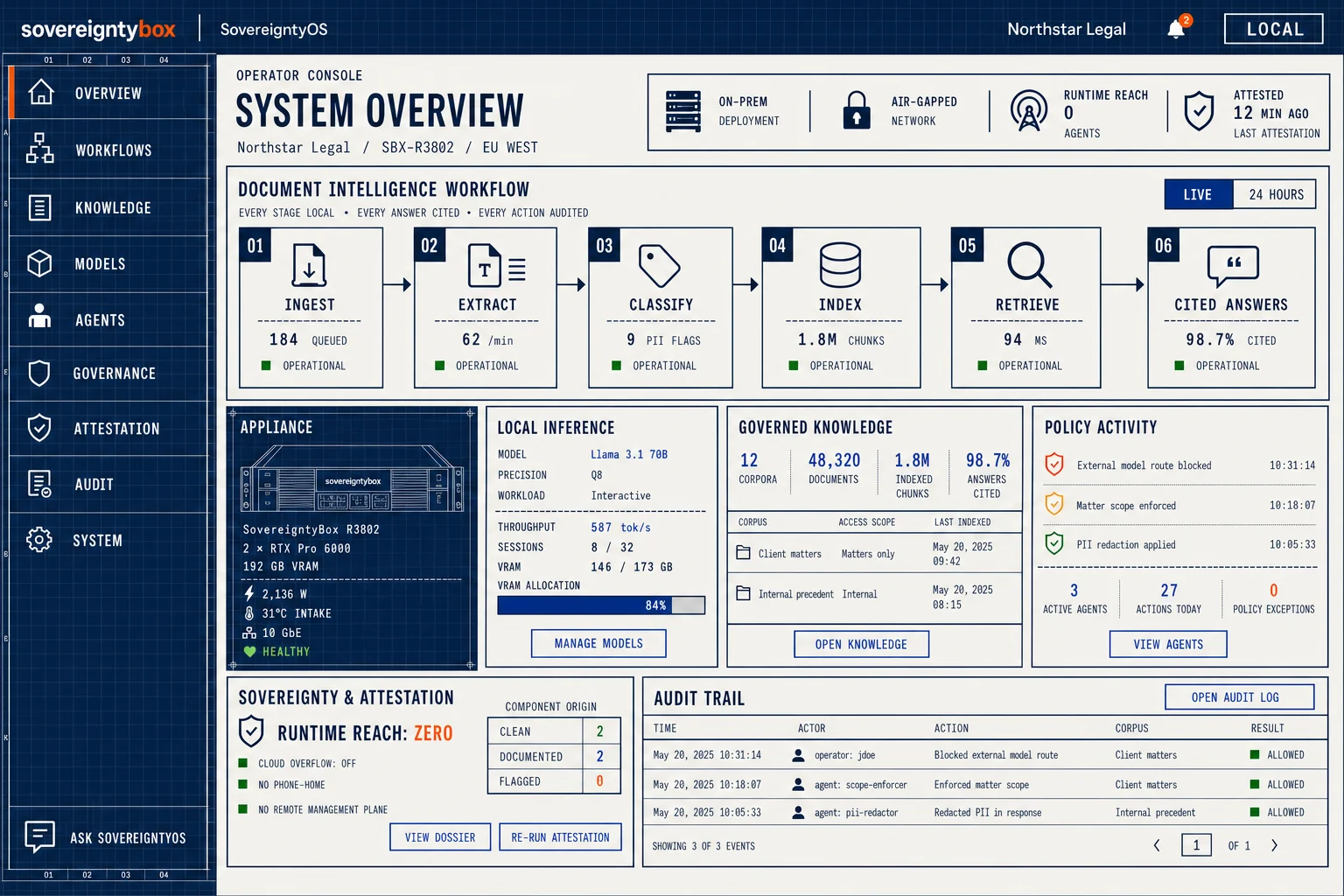
The operating view brings Sovereignty Report findings, document intake, permissions and Halo AI activity into one screen. You can inspect the source behind an answer, the action waiting for approval and the boundary in force when the work happened.
NOTHING SYNCS IN SECRET
You can begin with the public Halo AI using non-sensitive information. When you approve a system, the requirements, decisions, configuration and permitted sources become a visible, reviewable project package. You decide exactly what moves to the Halo AI on your SovereigntyBox; nothing is copied automatically.
From there, the Halo AI works inside your boundary with the approved records, model and tools available on the machine. Additional Halo AI roles can be added with separate documents, permissions and activity records. The Sovereignty Report records that handover, the active boundary and later changes so you can prove what is running and how it got there.
PUBLIC HALO AI → APPROVED PROJECT PACKAGE → HALO AI → SEPARATE BUSINESS ROLES